
Dans cette article, nous allons voir comment valider ou invalider automatiquement chaque champs (EditText) d’un formulaire.
La validation du formulaire en lui même, vérifiant que tous les champs de celui-ci sont valide sera vu dans un second article disponible sur ce lien.
Le projet de cette article est disponible ici.
Il a volontairement été « surchargé » par des commentaires et des logs, pour mieux comprendre le mécanisme de la validation.
Le principe est de surcharger le TextInputLayout pour pouvoir le personnaliser, et inclure automatiquement le TextInputEditText, personnalisé en fonction du type de champ que l’on souhaitera mettre en place (mot de passe, email,…)
1 – Petit rappel sur le TextInputLayout/TextInput EditText
Si vous utilisez le TextInputLayout/TextInputEditText, vous le mettrez en place de la façon suivante :
<android.support.design.widget.TextInputLayout
    android:id="@+id/text_input_email"
    android:layout_width="match_parent"
    android:layout_height="wrap_content"
    app:errorEnabled="true">

    <android.support.design.widget.TextInputEditText
        android:layout_width="match_parent"
        android:layout_height="wrap_content"
        android:hint="Votre E-mail"
        android:inputType="textEmailAddress"
    />

</android.support.design.widget.TextInputLayout>
2 – But de cet article
Nous allons remplacer le textInputLayout/TextInputEditText ci-dessus par le code suivant :
<xxx.xxxxxx.PersoTextInputLayout
    android:id="@+id/text_input_email"
    android:layout_width="match_parent"
    android:layout_height="wrap_content"

    app:input_type="email"
    app:hide_valid_indicator="false"
    app:color_style="@style/PersoEditTextBlue.EditText"
    app:edit_text_hint="Hint personnalisé"
/>
Vous pouvez voir 4 propriétés applicatives :
- app:input_type
- app:hide_valid_indicator
- app:color_style
- app:edit_text_hint
app:input_type : correspond au type de l’editText que vous souhaitez. Le projet contient les types suivants, cependant vous pouvez en ajouter comme bon vous semble :
- first_name
- last_name
- email_confirmation
- address
- postal_code
- city
- phone
- mobile_phone
- landline_phone
- birthday
- password
- new_password
- old_password
- confirm_password
- birthday_older_than_18
app:hide_valid_indicator : Vous permet de cacher l’icone de validation lorsque le champ est valide. Facultatif. Par défaut, l’icone est affiché
app:color_style : Vous permet de styliser le champ. Facultatif. Par défaut, il prendra le style « PersoTextInputLayout.EditText »
app:edit_text_hint : Vous permet de personnaliser le hint du champ. Facultatif. Par défaut, il prend une valeur différente en fonction du type défini. Ces valeurs sont définies dans le fichier strings.xml, et commencent par « common_field… »
Vous retrouverez aussi les messages d’erreurs dans ce même fichier, commençant par « form_error_… »
3 – Comportement au niveau de l’activité
Au niveau de l’activité, vous pouvez influencer le comportement de la validation de chaque champ de la façon suivante :
Si on reprend le champ eMail ci-dessus (@+id/text_input_email) :
3.1 – Désactivation de la validation du champ
- text_input_email.disablePatternValidation()
text_input_email.disablePatternValidation()
Cela va permettre d’ignorer la vérification du champ pour savoir si celui-ci est valide ou non.
Dans ce cas, et après un appel à la fonction text_input_email.validate(), ce champ sera alors valide.
Vous pouvez le vérifier par text_input_email.isValid().
3.2 – Vérification de deux champs identiques
Si nous avons un 2eme champ, ayant l’id text_input_email_confirmation, de type email_comfirmation, vous pouvez lier les 2 champs de la façon suivante :
- text_input_email_confirmation.isIdenticalTo(text_input_email)
text_input_email_confirmation.isIdenticalTo(text_input_email)
Dans ce cas, lorsque l’utilisateur renseignera ce champ, une action supplémentaire, permettant de vérifier si les 2 valeurs de ces deux champs sont identiques, sera effectuée.
3.3 – Validation manuelle d’un champ
Si vous souhaitez effectuer la vérification manuellement, vous pouvez le faire de la façon suivante :
- text_input_email.withExternalValidator(…)
etEmail.withExternalValidator(object : PersoTextInputLayout.Validator {
            override fun isValid(): Boolean {
                // Faire la vérification
                return true // or False !
            }
Vous retrouverez dans l’activité FormActivity du projet les exemples ci-dessus.
4 – Exemple d’un cas de figure
Utilisation du type : landline_phone
- Avec un mauvais numéro de téléphone

- Avec un numéro de téléphone fixe correct

- Avec un téléphone fixe incorrect et :
– landLinePhone.disablePatternValidation() – Au niveau de l’activité

Dans ce cas, la validation n’étant plus active, le champ est alors toujours valide :
landLinePhone.isValid() // = true
- Avec un téléphone fixe incorrect et
- landLinePhone.disablePatternValidation() – Au niveau de l’activité
- app:hide_valid_indicator= « true » – Au niveau du layout

Dans ce cas, la validation n’étant plus active, le champ est alors toujours valide :
landLinePhone.isValid() // = true
- Avec un numéro de téléphone correct et
- app:hide_valid_indicator= « true » – Au niveau du layout

Dans ce cas, la validation étant active, et le champ étant valide:
landLinePhone.isValid() // = true
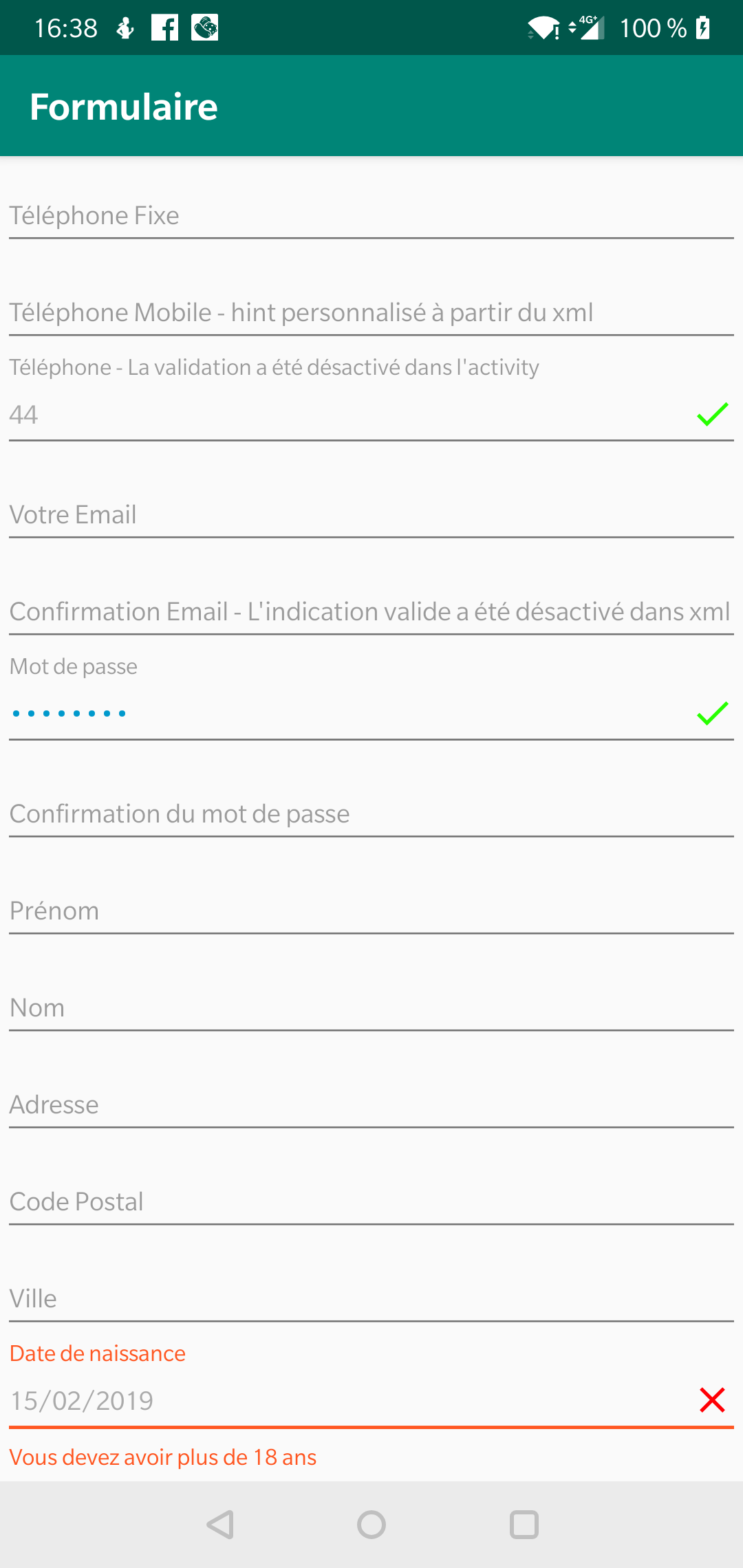
5 – Exemple de visualisation du projet
6 – Les principaux fichiers du projet
6.1 – L’activité
class FormActivity : AppCompatActivity() {

    override fun onCreate(savedInstanceState: Bundle?) {
        super.onCreate(savedInstanceState)
        setContentView(R.layout.activity_form)

        /********************************************************************/
        /* TEST du comportement de disablePatternValidation                 */
        /********************************************************************/
        // On met une valeur incorrecte dans le champ du téléphone
        phone.value="44"   // A ce stade, le message d'erreur ainsi que la croix est affichée dans la view

        Log.d("LOGFORM","Validation du phone pattern = ${phone.isValid()}") // La valeur est "false"

        // On demande de ne plus faire de vérification du champ
        phone.disablePatternValidation()
        // On refait une demande de validation
        phone.validate()

        // La valeur de phone.isValid() est maintenant à true.
        Log.d("LOGFORM","Validation du phone pattern = ${phone.isValid()}")

        /********************************/
        /* FIN DU TEST                  */
        /********************************/

        /**********************************************************************************************************/
        /*Permet de faire la vérification/validation en externe au lieu de le faire dans PersoTextInputLayout     */
        /**********************************************************************************************************/
        /*
         etEmail.withExternalValidator(object : PersoTextInputLayout.Validator {
            override fun isValid(): Boolean {
                // Faire la vérification
                return true // or False !
            }
        })
        */

        /********************************/
        /* FIN DU TEST                  */
        /********************************/

        /*****************************************************************************************/
        /* Permet de vérifer que le mot de passe de confirmation est identique au mot de passe   */
        /* La vérification se fera lors de la perte du focus sur le mot de passe de confirmation */
        /*****************************************************************************************/
        passwordConfirmation.isIdenticalTo(password)
        eMailConfirmation.isIdenticalTo(eMail)

        btnValidateForm.setOnClickListener {

            resultat.setText("La validation du formulaire est vu dans un autre article")

        }
    }
}
6.2 – Le Layout
<ScrollView xmlns:android="http://schemas.android.com/apk/res/android"
            xmlns:tools="http://schemas.android.com/tools"
            xmlns:app="http://schemas.android.com/apk/res-auto"
            android:layout_width="match_parent"
            android:layout_height="match_parent"
            android:layout_marginTop="1dp"
>

    <LinearLayout android:layout_width="match_parent"
                  android:layout_height="match_parent"
                  android:orientation="vertical"
    >

        <fr.sebastienlaunay.formulaire.PersoTextInputLayout
                android:id="@+id/landLinePhone"
                android:layout_width="match_parent"
                android:layout_height="wrap_content"
                android:layout_margin="1dp"
                tools:layout_height="30dp"
                tools:background="@color/colorPrimary"

                app:input_type="landline_phone"
                app:hide_valid_indicator="true"
        />

        <fr.sebastienlaunay.formulaire.PersoTextInputLayout
                android:id="@+id/mobilePhone"
                android:layout_width="match_parent"
                android:layout_height="wrap_content"
                android:layout_margin="1dp"
                tools:layout_height="30dp"
                tools:background="@color/colorPrimary"

                app:input_type="mobile_phone"
                app:hide_valid_indicator="false"
                app:edit_text_hint="Téléphone Mobile - hint personnalisé à partir du xml"
        />

      // [...]

      </LinearLayout>
</ScrollView>
6.3 – La classe PersoTextInputLayout
package fr.sebastienlaunay.formulaire

import android.app.DatePickerDialog
import android.content.Context
import android.support.design.widget.TextInputEditText
import android.support.design.widget.TextInputLayout
import android.text.InputType
import android.util.AttributeSet
import android.view.inputmethod.EditorInfo
import android.text.InputFilter
import android.util.Log
import android.view.View
import fr.sebastienlaunay.data.Constants
import org.joda.time.DateTime
import org.joda.time.Days
import org.joda.time.format.DateTimeFormat
import java.text.SimpleDateFormat
import java.util.*

@Suppress("DEPRECATION")
class PersoTextInputLayout : TextInputLayout, UField {

    enum class Type(val inputType: Int = -1, val hint: Int = -1) {
        FirstName(0, R.string.common_field_first_name_hint),
        LastName(1, R.string.common_field_last_name_hint),
        Email(2, R.string.common_field_email_hint),
        EmailConfirmation(3, R.string.common_field_email_confirmation_hint),
        Address(4, R.string.common_field_address_address_hint),
        PostalCode(5, R.string.common_field_postal_code_hint),
        City(6, R.string.common_field_city_hint),
        Phone(7, R.string.common_field_phone_hint),
        MobilePhone(8, R.string.common_field_mobile_phone),
        LandlinePhone(9, R.string.common_field_land_line_phone),
        BirthDay(10, R.string.common_field_birthday_hint),
        Password(11, R.string.common_field_password_hint),
        NewPassword(12, R.string.common_field_new_password_hint),
        OldPassword(13, R.string.common_field_old_password_hint),
        ConfirmPassword(14, R.string.common_field_password_confirmation_hint),
        BirthDayOlderThan18(15, R.string.common_field_birthday_hint),
        Text;

        companion object {
            fun from(inputType: Int): Type = Type.values().first { inputType == it.inputType }
        }
    }

    private lateinit var mEditText: TextInputEditText
    private lateinit var mType: Type
    private var mHideValidIndicator: Boolean = false
    private var mExternalValidator: Validator? = null
    private var mDisablePatternValidation = false
    private val mCalendar = Calendar.getInstance(TimeZone.getDefault()) // Utilisé par le date picker

    // Permet de vérifier que le contenu (la valeur) d'un autre PersoTextInputLayout est identique à celui-ci
    private var mReferenceToConfirm: PersoTextInputLayout? = null

    constructor(context: Context) : super(context) {
        init(context, null, 0)
    }

    constructor(context: Context, attrs: AttributeSet?) : super(context, attrs) {
        init(context, attrs, 0)
    }

    constructor(context: Context, attrs: AttributeSet?, defStyleAttr: Int) : super(context, attrs, defStyleAttr) {
        init(context, attrs, defStyleAttr)
    }

    private fun init(context: Context, attrs: AttributeSet?, defStyleAttr: Int) {

        //mEditText = AppCompatEditText(context)
        mEditText = TextInputEditText(context)
        mEditText.maxLines = 1
        mEditText.imeOptions = EditorInfo.IME_ACTION_NEXT

        val a = context.obtainStyledAttributes(attrs, R.styleable.PersoTextInputLayout, defStyleAttr, 0)

        // Récupération de la valeur de app:edit_text_hint défini dans le fichier xml
        val customHint = a.getString(R.styleable.PersoTextInputLayout_edit_text_hint)

        customHint?.let { Log.d("LOGFORM", "customerHint = $it") } ?: run { Log.d("LOGFORM", "customHint non défini") }

        // Récupération du type de champs provenant de app:input_type défini dans le fichier xml
        mType = Type.from(a.getInt(R.styleable.PersoTextInputLayout_input_type, -1))

        if (mType == Type.Text) {
            Log.d("LOGFORM", "app:input_type n'a pas été défini dans le fichier xml - mType.")
        } else {
            Log.d(
                "LOGFORM",
                "app:input_type a été défini dans le fichier xml avec mType.inputType : ${mType.inputType} - mType.hint correspondant est  : ${context.getString(
                    mType.hint
                )} - "
            )
        }

        // Récupération du Style défini au niveau de app:color_style du fichier xml.
        // Si aucun style défini au niveau du xml, utilisation du style PersoEditTextGrey_EditText
        val style = a.getResourceId(R.styleable.PersoTextInputLayout_color_style, R.style.PersoTextInputLayout_EditText)

        mEditText.setTextAppearance(context, style)

        // Récupération de app:hide_valid_indicator défini dans le fichier xml
        // Si celui-ci n'existe pas, prend la valeur false par défaut
        // Cela va permettre d'afficher ou de cacher l'indicateur de validation du champ dans la méthode valide()
        mHideValidIndicator = a.getBoolean(R.styleable.PersoTextInputLayout_hide_valid_indicator, false)

        a.recycle()

        // S'il y a une valeur dans app:edit_text_hint ou s'il y a une valeur dans app:input_type
        // (Dans le cas contraire, la valeur sera celle indiquée dans android:hint défini dans le fichier xml.
        if (customHint != null || mType != Type.Text) {

            // hint = customHint , si il y a une valeur dans customerHint
            // Sinon, hint = la valeur dans mType.hint
            hint = customHint ?: context.getString(mType.hint)

            // Pas sur de l'utilité de mettre un contentDescription a la vue, sachant que ce n'est pas une image
            contentDescription = customHint ?: context.getString(mType.hint)
        }

        mEditText.apply {

            // En fonction du type du champ, on applique l'inputType correspondant.
            // Cela permet, entre autre, d'afficher le clavier correspondant.
            // https://developer.android.com/reference/android/text/InputType
            inputType = when (mType) {
                Type.Email -> InputType.TYPE_CLASS_TEXT or InputType.TYPE_TEXT_VARIATION_EMAIL_ADDRESS
                Type.Phone, Type.MobilePhone, Type.LandlinePhone -> InputType.TYPE_CLASS_PHONE
                Type.Password, Type.ConfirmPassword, Type.OldPassword, Type.NewPassword -> InputType.TYPE_CLASS_TEXT or InputType.TYPE_TEXT_VARIATION_PASSWORD
                Type.PostalCode -> InputType.TYPE_CLASS_NUMBER
                Type.BirthDay, Type.BirthDayOlderThan18 -> InputType.TYPE_NULL

                else -> InputType.TYPE_CLASS_TEXT or InputType.TYPE_TEXT_FLAG_CAP_WORDS
            }

            // Permet d'appliquer des filtres en fonction du type du champ.
            when (mType) {
                // Par exemple, l'edittext pour un type Phone, sera limiter à PHONE_NUMBER_LENGTH caractères
                Type.Phone -> filters = arrayOf(InputFilter.LengthFilter(Constants.InputType.PHONE_NUMBER_LENGTH))
                Type.FirstName, Type.LastName -> filters = arrayOf(InputFilter.LengthFilter(Constants.InputType.MAX_LENGTH))
            }
        }

        // Ajout de l'editText à la vue
        addView(mEditText)

        // Lors que l'on a déjà le focus, c'est le click listener qui est appelé.
        mEditText.setOnClickListener {

            when (mType) {
                Type.BirthDay, Type.BirthDayOlderThan18 -> openBirthdayDatePicker()
            }
        }

        mEditText.setOnFocusChangeListener { _, focus ->

            Log.d("LOGFORM", "FocusChanged - View : $contentDescription - Focus : $focus ")

            validate(!focus)

            if (focus && mType == Type.BirthDay) openBirthdayDatePicker()
            if (focus && mType == Type.BirthDayOlderThan18) openBirthdayDatePicker()
        }
    }

    fun isEmpty(): Boolean = value.isNullOrEmpty()

    var value: String?
        get() = mEditText.text.toString()
        set(value) {
            mEditText.apply {
                setText(value ?: "")
                setSelection(mEditText.text?.length ?: 0)
            }
            validate()
        }

    var dateValue: Date?
        get() = mCalendar.time
        set(date) {
            date?.let {
                mCalendar.time = it
                value = SimpleDateFormat(Constants.InputType.BIRTHDAY_FORMAT, Locale.getDefault()).format(it)
            }
        }

    override fun isValid(): Boolean {

        // Si la vérification est faire en externe
        mExternalValidator?.let {
            // On retourne le résultat de cette vérification externe
            return it.isValid()
        }
        // Sinon, on retourne la vérification interne suivante :
            ?: run {

                return (visibility != View.VISIBLE || !isEnabled)
                        || (!isEmpty()
                        && (mDisablePatternValidation || isValidPattern())
                        && (mReferenceToConfirm == null || isReferenceValidConfirmation())
                        )
            }

        // La vérification interne correspond la logique suivante :
        //
        //        Le Champ PersoTextInputLayout est Valide
        //
        //        SI (
        //            Ce champ n'est pas visible (View.VISIBLE)
        //            OU
        //            Si ce champ n'est pas activé (enabled)
        //        )
        //        OU SI (
        //                Ce champ n'est pas vide (!isEmpty())
        //                ET (
        //                     Si l'on a demandé de ne pas faire de Validation de Pattern (mDisablePatternValidation)
        //                     OU
        //                     Si le Pattern est validé (isValidPattern()
        //                )
        //                ET (
        //                     S'il n'y a pas d'autre référence à confimer (mReferenceToConfirm)
        //                     OU
        //                     Si la Référence est bien confirmée (isReferenceValidConfirmation())
        //                )
        //         )
    }

    private fun openBirthdayDatePicker() {
        Log.d("LOGFORM", "Affichage du date picker")
        DatePickerDialog(
            context,
            R.style.PersoTextInputLayout_DatePickerDialog,

            DatePickerDialog.OnDateSetListener { _, year, monthOfYear, dayOfMonth ->
                mCalendar.set(Calendar.YEAR, year)
                mCalendar.set(Calendar.MONTH, monthOfYear)
                mCalendar.set(Calendar.DAY_OF_MONTH, dayOfMonth)
                dateValue = mCalendar.time
            },
            mCalendar.get(Calendar.YEAR),
            mCalendar.get(Calendar.MONTH),
            mCalendar.get(Calendar.DAY_OF_MONTH)
        ).apply {
            datePicker.maxDate = Date().time
            show()
        }
    }

    // Permet d'effectuer la validation du PersoTextInputLayout
    fun validate(showError: Boolean = true) {

        // Si on ne doit pas afficher l'erreur, on enlève l'icone X ou V
        if (!showError) {
            mEditText.setCompoundDrawablesWithIntrinsicBounds(0, 0, 0, 0)
        }

        // Si on ne doit pas afficher l'erreur, ou si le champ est vide, on indique alors aucune erreur
        if (!showError || isEmpty()) {
            error = null
            isErrorEnabled = false  // Permet de ne pas avoir d'espace vide après l'affichage d'une erreur
            // Besoin d'être défini après un error = null
        } else { // Sinon : On vérifie que le champ est valide
            when {

                // Si le champ n'est pas valide
                !isValid() -> {
                    // On affiche le message d'erreur correspondant au Type du champ
                    error = when (mType) {
                        Type.LandlinePhone -> context.getString(R.string.form_error_landline_phone_format)
                        Type.MobilePhone -> context.getString(R.string.form_error_mobile_phone_format)
                        Type.Email -> context.getString(R.string.form_error_email_format)
                        Type.Phone -> context.getString(R.string.form_error_phone_format)
                        Type.Password, Type.NewPassword, Type.OldPassword -> context.getString(R.string.form_error_password_format)
                        Type.ConfirmPassword -> context.getString(R.string.form_error_confirm_password_format)
                        Type.FirstName, Type.LastName -> context.getString(R.string.form_error_name_format)
                        Type.EmailConfirmation -> context.getString(R.string.form_error_confirm_email_format)
                        Type.PostalCode -> context.getString(R.string.form_error_postal_code)
                        Type.BirthDayOlderThan18 -> context.getString(R.string.form_error_birthday_not_older_than_18)
                        else -> null
                    }

                    if (error == null) isErrorEnabled = false  // Voir ci-dessus la raison de cette ligne

                    // On affiche l'icone X
                    mEditText.setCompoundDrawablesWithIntrinsicBounds(0, 0, R.drawable.ico_formular_field_error, 0)
                }
                // Si le champ est valide
                else -> {
                    // On affiche aucun message d'erreur
                    error = null
                    isErrorEnabled = false

                    // Sous condition que app:hide_valid_indicator n'est pas indiqué à true dans le fichier xml
                    val drawable = when (mHideValidIndicator) {
                        true -> 0
                        false -> R.drawable.ico_formular_field_ok
                    }
                    // on affiche l'icone de validation V
                    mEditText.setCompoundDrawablesWithIntrinsicBounds(0, 0, drawable, 0)
                }
            }
        }
    }

    // Permet de ne faire aucune validation du pattern en interne.
    fun disablePatternValidation(): PersoTextInputLayout {
        mDisablePatternValidation = true
        return this
    }

    // Permet de faire la validation du champ en externe
    fun withExternalValidator(validator: Validator): PersoTextInputLayout {
        mExternalValidator = validator
        return this
    }

    // Permet de vérifier que la valeur d'une référence (d'un PersoTextInputLayout) est équivalente à une autre référence
    fun isIdenticalTo(reference: PersoTextInputLayout): PersoTextInputLayout {
        mReferenceToConfirm = reference
        return this
    }

    private fun isReferenceValidConfirmation(): Boolean = mReferenceToConfirm?.value == this.value

    private fun isValidPattern(): Boolean {

        value?.let { value ->
            when (mType) {
                Type.LandlinePhone -> return Regex(Constants.InputType.LANDLINE_PHONE_PATTERN).matches(value)
                Type.MobilePhone -> return Regex(Constants.InputType.MOBILE_PHONE_PATTERN).matches(value)
                Type.Phone -> return (Regex(Constants.InputType.LANDLINE_PHONE_PATTERN).matches(value)
                    .xor(Regex(Constants.InputType.MOBILE_PHONE_PATTERN).matches(value)))
                Type.Password, Type.NewPassword, Type.OldPassword -> return Regex(Constants.InputType.PASSWORD_PATTERN).matches(
                    value
                )
                Type.FirstName, Type.LastName -> return Regex(Constants.InputType.NAME_PATTERN).matches(value)
                Type.Email -> return Regex(Constants.InputType.EMAIL_PATTERN).matches(value)
                Type.PostalCode -> return Regex(Constants.InputType.CODE_POSTAL_PATTERN).matches(value)
                Type.BirthDayOlderThan18 -> return isUser18Older(value)
                else -> return true
            }
        }
    }

    interface Validator {
        fun isValid(): Boolean
    }

    fun isUser18Older(value: String): Boolean {
        val dtf = DateTimeFormat.forPattern(Constants.InputType.BIRTHDAY_FORMAT)
        val date = dtf.parseDateTime(value)
        val minAge = DateTime()
        val days = Days.daysBetween(date, minAge.minusYears(18))
        return days.getDays() >= 0
    }
}